The best bookmark managers in 2026
And how to choose the right one for you
 By Esteban P.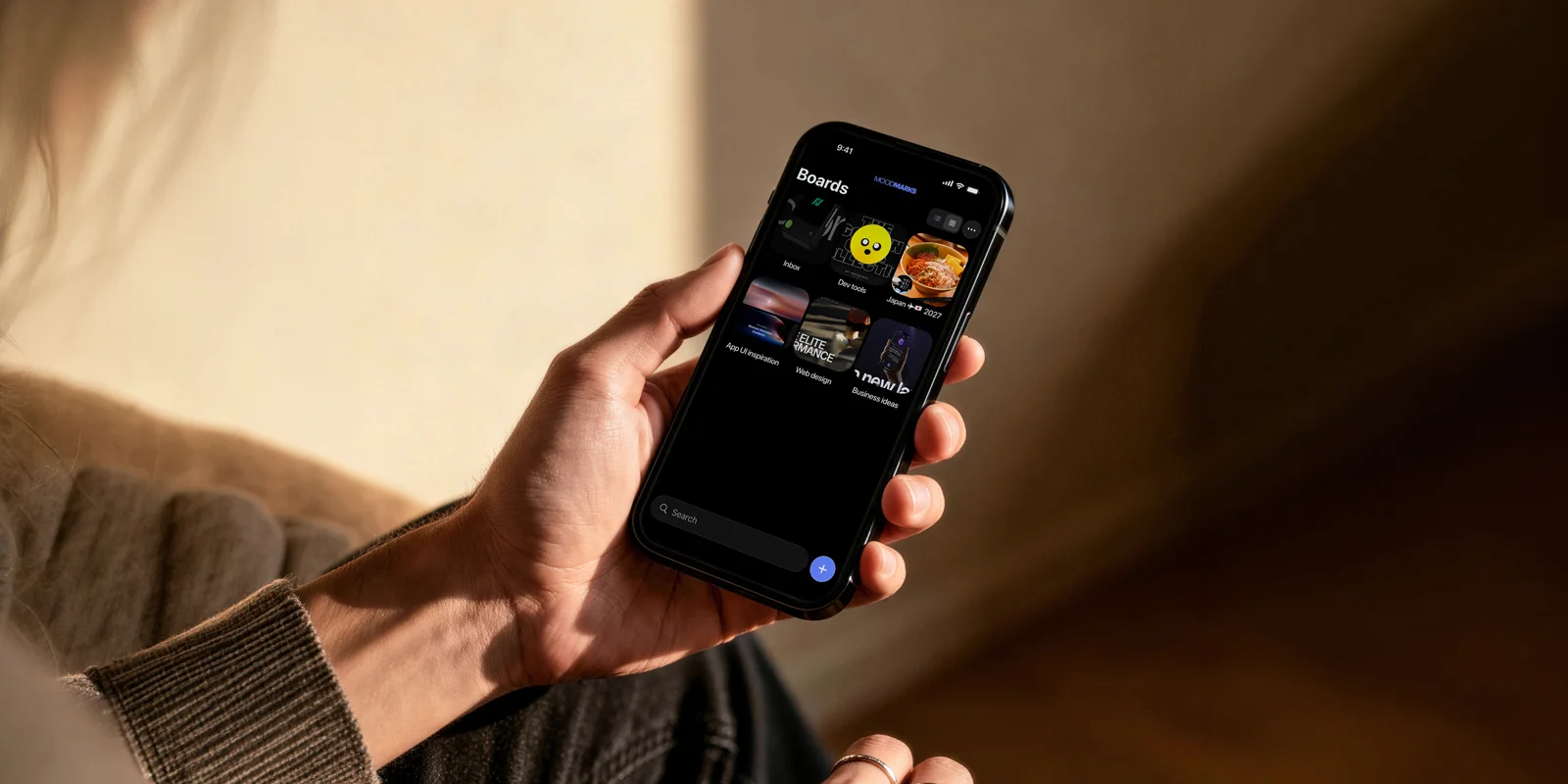
The best bookmark managers in 2026
If you are choosing a bookmark manager in 2026, the list looks very different than it did two years ago. Pocket, the most famous save-for-later app of all, shut down in July 2025. Omnivore, the open-source favorite, closed in late 2024. Millions of people who trusted those apps with years of saved links are now looking for a new home.
So which one should you pick? The honest answer: it depends on what you save things for. Most people never ask themselves that question, and it is the only one that matters.
First, know your saving style
There are three kinds of savers:
- Readers. You save articles to read them later, usually once, usually in order.
- Archivists. You save everything you might ever need again, and you want it stored forever.
- Builders. You save links, references and ideas because you plan to use them in something: a design project, an article, a thesis, an app.
Every app below is great for one of these styles and mediocre for the others. Here is the field.
Raindrop.io: the archive
Raindrop is the most complete bookmark manager on the market and the current category leader. Unlimited bookmarks on the free plan, apps for every platform, browser extensions, and visual collections with covers and icons. At $27.99 per year for Pro, it is also the cheapest paid option.
The trade-offs: full-text search, annotations and permanent copies are locked behind Pro, and its collections behave like folders. Raindrop is built for storing things well, not for coming back and using them. If you are an archivist, this is your app.
Matter: the reading experience
Matter is the best pure reading app in the category. Clean typography, excellent text-to-speech, a newsletter inbox, and YouTube videos transcribed into readable text. It is aimed squarely at people who read a lot and want one calm place to do it.
The trade-offs: at $79.99 per year it is the most expensive option, and it organizes everything as a reading queue. There is no concept of a project. If you are a reader with a serious article habit, Matter earns its price.
GoodLinks: the Apple purist
GoodLinks is a one-time purchase ($9.99), needs no account, syncs through iCloud, and feels completely native on iPhone, iPad and Mac. For subscription-fatigued Apple users it is an easy recommendation, and its App Store rating (4.7) is the best in the category.
The trade-offs: it is a reading app organized with tags, it only exists on Apple platforms, and organizing by topic or project is not what it is designed for.
Instapaper: the veteran
Instapaper has been saving articles since before most of its competitors existed. It still does the basics well and it is the only one with real Kindle and Kobo integration. But the product has changed little in years, and most of what it does, Matter now does better. A reasonable choice mainly if you read on an e-reader.
Moodmarks: the one for projects
Moodmarks is our app, so judge this section with that in mind. We built it because none of the apps above answer a simple question: what if you save things not to read them or to file them, but to build something with them?
In Moodmarks, everything lives in boards, and a board is a project. The inspiration for a rebrand, the references for a thesis, the articles for your next post: each has its own space, so when you sit down to work, everything you saved for that project is already together. Saving is instant, search is not paywalled, and the free plan lets you try the whole system with 5 boards.
The trade-offs, honestly: Moodmarks is iOS-only today, there is no browser extension yet, and it is deliberately simple. If you need highlights, read-later queues or a web app, the apps above serve you better. If you save things to use them, this is the one built for you.
The comparison at a glance
| App | Organized by | Best for | Price |
|---|---|---|---|
| Raindrop.io | Collections (folders) | Archiving everything | Free / $27.99 yr |
| Matter | Reading queue | Reading a lot | Free / $79.99 yr |
| GoodLinks | Tags | Reading on Apple devices | $9.99 once |
| Instapaper | Folders | E-reader reading | Free / $59.99 yr |
| Moodmarks | Boards (projects) | Using what you save | Free to start |
Prices and ratings as of August 2026.
How to decide
- You mostly read articles. Matter if you want the premium experience, GoodLinks if you want to pay once and stay in the Apple world.
- You archive everything. Raindrop, without hesitation.
- You save things for projects. That gap in the market is exactly why Moodmarks exists.
Whatever you choose, choose deliberately. The Pocket shutdown taught everyone the same lesson: your saved links are only as useful as the system they live in.
Ready to give your links a purpose? Download Moodmarks on the App Store and start your first board.
Other articles you might like
More ideas on saving links and organizing what you find.

The best PKM app for iPhone is the one you'll actually feed
What personal knowledge management actually requires on a phone, and how to tell a real PKM app from a note app wearing a PKM label.
How to build a second brain without buying five apps
A second brain needs three habits, not a stack of tools. Here's the version that fits in your pocket.

Why your reading list never gets read
It isn't a discipline problem. A reading list is the wrong shape for most of what people save.